
Folder Template Creator Release Notes 2.0.x
OVERVIEW
This release of the FYB Folder Template Creator includes all fixes and enhancements that were shipped in the previous releases of the product. For details of the previous release, please refer to the relevant release notes.
Note that this version of Folder Template Creator (v3) is a major update and is not backwards compatible with previous versions.
To preserve existing connections a backup of your current version must be taken, and existing connections will need to be re-imported via the admin console after installation is complete.
You should complete a full uninstall of the previous version before installing this version. The uninstall steps can be found in the relevant version’s installation guide.
You will also need to obtain a new license type from FYB if upgrading to this version. Previous license files will not work even if they have not expired.
RELEASE 2.0.6
BREAKING CHANGES
WARNING: This version of Folder Template Creator contains breaking changes. If upgrading from a previous version, existing templates will need to be reconfigured. The following enhancements are considering breaking changes: • CONVERSION TO WEB APPLICATION Further details can be found in the relevant sections below.
NEW FEATURES
CONVERSION TO WEB APPLICATION
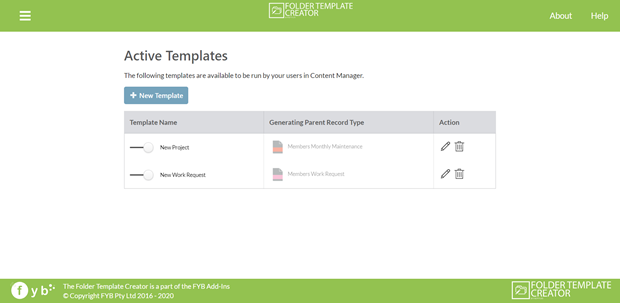
Folder Template Creator has been converted to a web application. This includes an new intuitive web interface where all folder template structures are designed and maintained.
ARCHIVING FOLDER TEMPLATES
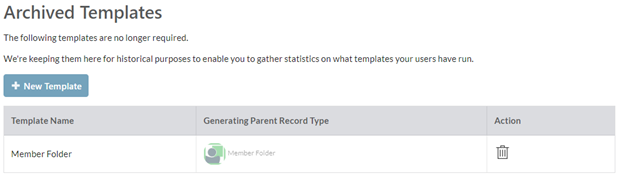
Unused folder templates now have the option to be archived within the Folder Template Creator web application, to be retained for reactivation at a later stage if required. All folder templates created contain the ability to toggle its activation status using the toggle button.
EDITING EXISITING TEMPLATES
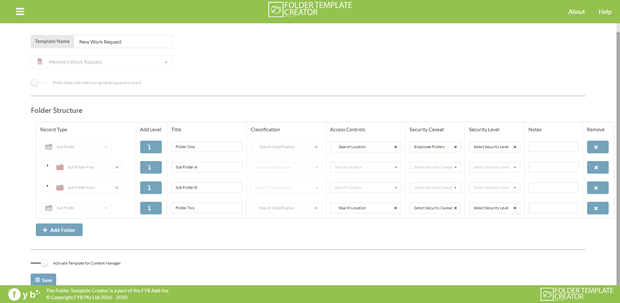
Folder Template Creator provides Administrators the ability to edit pre-existing templates using the web interface.
AUTOMATIC INSTALLATION OF TEMPLATE INTO CONTENT MANAGER
Folder Template Creator now contains the ability to automatically implement any folder template created into Content Manager when the activate template button is toggled during the creation or editing process of a template.
This feature requires the installation of the record add-in component prior to use.

BUG FIXES
N/A
ENHANCED FEATURES
N/A
LIMITATIONS
MANUAL RECORD NUMBERING
The FYB Folder Template Creator does not support record types that require manual entering of the record numbering.
ADDITIONAL FIELDS LINKING TO EXTERNAL ADD-INS
If the record type is linked to additional fields that use third party external add-ins, then this record type cannot be used with the FYB Folder Template Creator.
ALTERNATIVELY CONTAINED FOLDER STRUCTURES
The FYB Folder Template Creator does not support the ability to create folder structures with alternatively contained relationships
STRUCTURES USING SUB FOLDERS AS PARENT
Currently Folder Template Creator cannot create structures using sub folder record types rfom one structure as the parent record of a new structure