
Pathway2CM License Update Guide
LICENSE DETAILS
Please contact FYB for a valid license if you are yet to obtain one for your Connector.
UPLOADING THE LICENSE FILE
:::(Info) (Note) This process may require assistance from your IT Department :::
-
Log into the server where Pathway2CM is installed and navigate to the License folder
NoteYou will be able to find the existing license folder by looking at the path in the config file. Please refer to step 6
-
Copy the new license file into the license folder

-
Navigate back one folder from the license folder
-
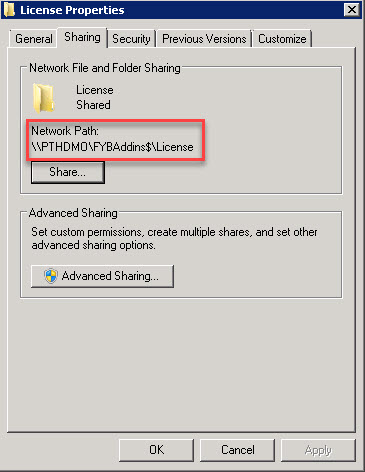
Right-click > properties on the license folder and select the Sharing tab. Copy the network path
-
Navigate to the Pathway2CM installation directory and open the MSC folder. For example, C:\Infor\Pathway\Demo\msc. Locate the Pathway.Connector.FYB.Pathway2CM.dll.config file and edit it
-
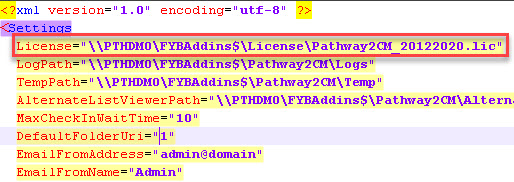
Highlight and delete the old license path within the configuration file and paste in the new license path currently on your clipboard. You'll need to append the name of the license file to the end of this path
-
Save the changes made to the configuration file
-
Ensure a refresh of Pathway is completed