Sales2CM Troubleshooting Guide
OVERVIEW
The following guide lists some of the common Sales2CM issues you may experience along with the possible cause and resolution.
FAILURE TO LOAD SALES2CM INTERFACE
DESCRIPTION
You receive the following errors within the log files:
- Authentication response: Status Code: 400., Reason Phrase: 'Bad Request'
- There was an error during processing of the managed application service auto-start for configuration path: 'MACHINE/WEBROOT/APPHOST/FYB Demo/Sales2CM'. The error message returned is: 'An error occurred while executing Preload method. The given key was not present in the dictionary
CAUSE
The application cannot authenticate to Salesforce correctly.
RESOLUTION
-
Confirm the account being used by Sales2CM has admin access for enabling authentication.
-
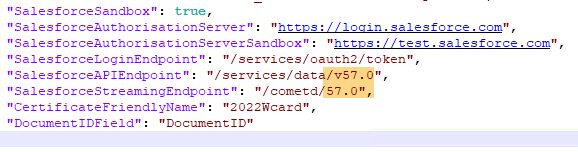
Confirm the certificate friendly name shown in the appsettings.json matches the one installed on the server (in certificate manager)
-
Confirm that the account running the app pool has full access to the private key for the certificate on the server
-
Confirm if the Salesforce instance is a production or sandbox instance. If it is a sandbox instance, please ensure the Sales2CM has "Sandbox" enabled to true.
-
Confirm the Salesforce version matches the API Endpoints within the SettingsGeneral.json file. By default this is set to v49.0, but newer instances of Salesforce require a higher version. The version should match the current salesforce instance.
-
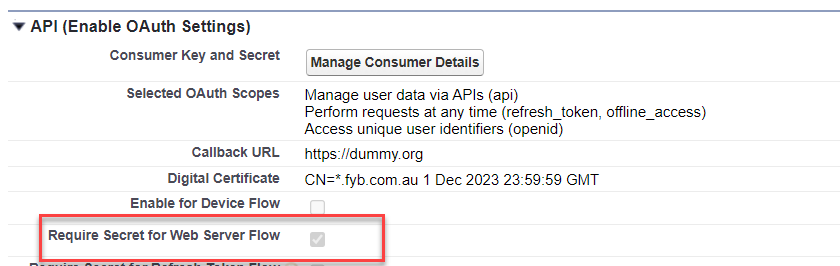
Confirm that 'Require Secret for Web Server Flow' has been enabled on the Sales2CM app within Salesforce.