
Soft Deleter License Update
LICENSE DETAILS
Please contact FYB for a valid license if you are yet to obtain one for your Connector.
UPDATING LICENSE FOR SOFT DELETER
-
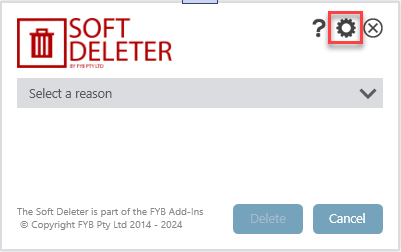
Open Content Manager and trigger Soft Deleter to appear
-
Click on the settings icon
-
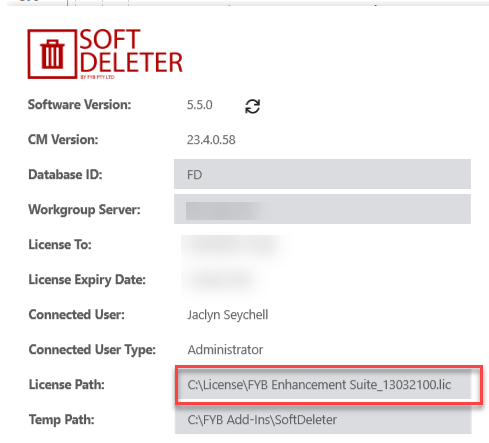
When the Administration menu appears, click on the License Path field
-
A File Explorer window will appear
-
Navigate to your license file and click on the Open button

-
Click on the Update button on the Administration menu to save the updated license setting

UPDATING LICENSE FOR THE SOFT DELETER EVENT ADDIN
If your organisation uses the Soft Deleter Event Add-in there are some additional steps you need to complete. You do not need to complete these steps if you are not using the event add-in.
-
Navigate to the server where Soft Deleter Event Add-In is installed (usually the event processing server). Navigate to Content Manager's installation directory. For example, C:\Program Files\Micro Focus\Content Manager
-
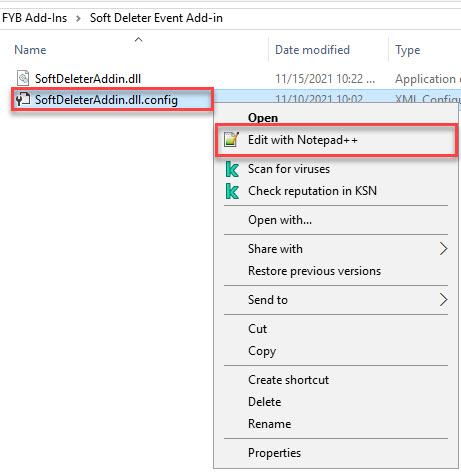
Right-click on the SoftDeleterAddIn.dll.config file and select the Edit option
-
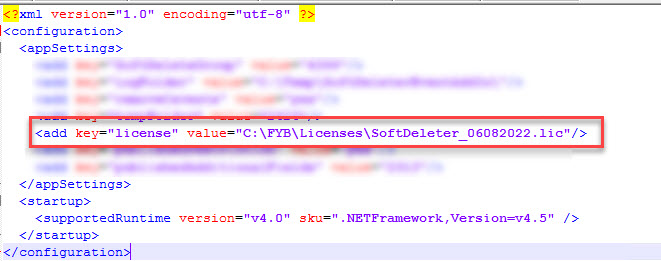
Within the config file, replace the license value with the path of the new license
-
Save the file's new changes