
DocUMove Troubleshooting Guide
OVERVIEW
The following guide lists some of the common DocUMove issues you may experience along with the possible cause and resolution.
UNABLE TO WRITE TO EVENT LOG
DESCRIPTION
An error shows in the event log that states CM2WebShare cannot write to the event log due to security restrictions.
CAUSE
Incorrect Local Security Policy settings.
RESOLUTION
Follow the steps in this guide: https://mohsartawi.wordpress.com/2014/12/16/give-non-administrator-user-an-access-to-read-the-event-logs-in-active-directory/
SITE BLOCKED BY CORS POLICY
DESCRIPTION
You see an error stating that the site has been blocked by the CORS policy.
CAUSE
The site is being blocked by the CORS policy or the IIS CORS module is not installed.
RESOLUTION
Ensure that the IIS CORS module is installed on the server: https://www.iis.net/downloads/microsoft/iis-cors-module
VALUE CANNOT BE NULL (PATH1)
DESCRIPTION
You receive the following error when attempting to load CM2WebShare. Value cannot be null. Parameter name: path1
CAUSE
The 64bit Content Manager client is not installed on the server which means CM2WebShare cannot access the SDK.
RESOLUTION
Ensure the 64bit Content Manager client is installed on the server. Or alternatively, use the clientless install feature.
UNABLE TO ACCESS WEB.CONFIG FILE FROM IIS
DESCRIPTION
After installation, if you attempt to access the web.config file via application settings in IIS you see this message.
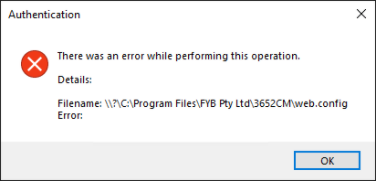
CAUSE
.NET Core pre-requisites haven't been installed properly.
RESOLUTION
Confirm that both the .NET Core SDK and .NET Core Hosting Bundle have been installed on the server. If they have then make sure a full server restart has been completed as this allows them to bind to IIS. Details can be found in the pre-requisite and install guides.
Record Types not Appearing within Drop Down
DESCRIPTION
When uploading files, a specific record type is not avaliable to be selected.
CAUSE
This issue is caused as the Record Type has not been selected for use within the Admin Console.
RESOLUTION
Contact your Content Manager Administrator to them enable the record type within the admin console
Records Too Large or Numerous to Transfer
DESCRIPTION
Unable to upload records when the file size is over a certain size
CAUSE
DocUMove is restricted by the the browsers innate document size restrictions, which generally have an upper limit of 4 GB per transfer
RESOLUTION
If possible, lower the amount of documents transferring through in a single instance.
How to Update DocUMove Upload Form
DESCRIPTION
User is unable to find the options to update the different metadata values on the DocUMove Upload form.
CAUSE
The variables used by the DocUMove upload form is taken directly from the 'Form' field from Content Manager Record Type.
RESOLUTION
To Upload form within DocUMove, update the Record Type form within Content Manager.