
FYB Connect 365|2CM Troubleshooting guide
SENT TO CM FIELD NOT POPULATING
If the Sent To CM field is not populating:
- Ensure you are at the root document library of the site in SharePoint
- Delete and recreate the Sent To CM Column
CONTAINERS ARE NOT BEING CREATED
DESCRIPTION
Containers are not being created when the Create Folder option is enabled.
CAUSE
There may be a Content Manager setting placed on the container record type used for 365|2CM to prevent alternatively contained relationships.
RESOLUTION
Check settings in Content Manager on the container record type that is used in 365|2CM. Ensure that there are no restrictions in place that prevent alternatively contained relationships from being made.
CANNOT SEE ALL TEAMS/SHAREPOINT SITES
DESCRIPTION
You are not able to see all SharePoint or Teams sites from 365|2CM that you can see from the M365 admin center.
CAUSE
365|2CM is not the same as the Teams/SharePoint Admin Centre. When logging into 365|2CM you will be able to see all sites for the organisation that the logged in user has access to. An easy way to check and confirm what sites the user has access to is by using the Microsoft Graph Explorer. Note that users will need to be an Owner or Member of a site for it to appear in 365|2CM. When adding new users to sites it can take several hours before they appear.
RESOLUTION
-
Navigate to: https://developer.microsoft.com/en-us/graph/graph-explorer
-
Sign in with your account
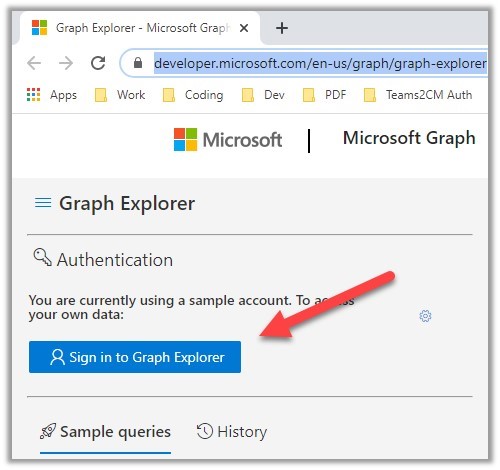
3.Run the following GET query: https://graph.microsoft.com/v1.0/sites?search=*

-
Check if you can see the required site in the list returned. If you can't see the site using the Graph Explorer then you won't be able to see it using 365|2CM
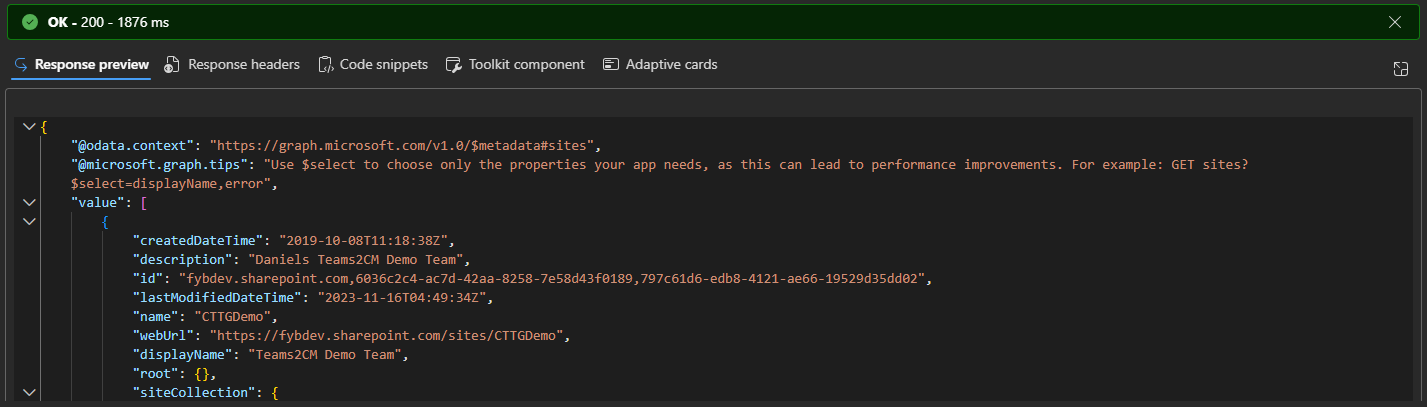 Note
In certain cases, owners of Teams cannot see the sites but members can. This is a known issue with Microsoft Graph. Owners will need to have both the owner and member roles. This can occur if your Teams are created via a PowerShell script as PowerShell does not create owners correctly and skips the member association.
NoteYou may need to trigger the SharePoint crawling for the site to show up in Graph/365|2CM. The easiest way to do this is to upload some documents, this will trigger the crawling.