
Ungerboeck2CM License Update Guide
LICENSE DETAILS
Please contact FYB for a valid license if you are yet to obtain one for your Connector.
UPLOADING THE LICENSE FILE
:::(Info) (Note) This process may require to be completed by your IT Department :::
-
Log into the server where Ungerboek2CM is installed and navigate to the License folder
-
Copy the new license file into the license folder

-
With your keyboard, hold the shift button and right click on the new license file to display a list of options
-
Select Copy as path to copy the direct pathway of the License Location

-
Navigate to the Ungerboeck2CM Folder and right click on the Configuration file and select Edit
NoteAlways Edit the configuration file with Notepad
-
Highlight and delete the old license path within the configuration file and paste in the new license path currently on your clipboard
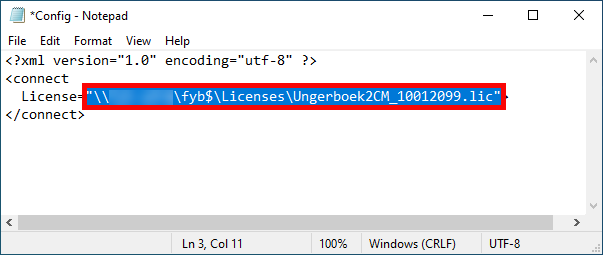 :::(Info) (Note)
When you copy as path it includes "" on either side. Make sure that you remove the additional " for the start and end of the copy path
:::
-
Save the changes made to the configuration file
ADDITIONAL DATASETS
Please ensure that you update the license completing the above process for all additional datasets.