
Mediazel Release Notes 6.0.x
OVERVIEW
This release of the FYB Mediazel includes all fixes and enhancements that were addressed in the previous releases of the product. For details of previous releases, please refer to the relevant release notes.
Note that this version of Mediazel (v8) is a major update and is not backwards compatible with previous versions.
To preserve existing settings, a backup of your current version must be taken and existing settings will need to be re-imported via the admin console after installation is complete.
You should complete a full uninstall of the previous version before installing this version. The uninstall steps can be found in the relevant versions installation guide.
You will also need to obtain a new license type from FYB if upgrading to this version. Previous license files will not work even if they have not expired.
RELEASE 6.0.5
NEW FEATURES
REBRANDING
The FYB MediaHub has been rebranded to the FYB Mediazel.
GOOGLE VISION API
Mediazel has been integrated with Google Vision to provide an auto image classification service; this will automatically pre-populate the tags to the media items as they upload.
Note: This feature is not enabled by default, please refer to the FYB Mediazel installation guide for instruction on how to enable this feature in the Mediazel.
JUSTIFIED DISPLAY
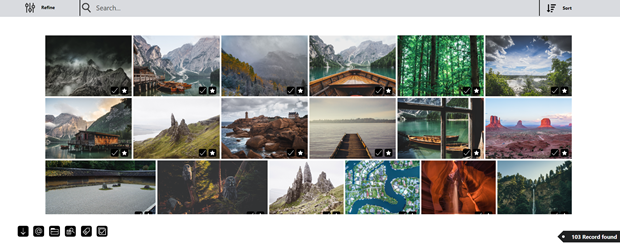
Media item thumbnail alignment is now justified
SORTING
The ability for users to sort the current search results has been added.

THUMBNAIL HOVER EFFECT
A thumbnail however effect to display the Title and Author of the media item when hovering the cursor over a particular thumbnail has been added.

EVENT PROCESSING REMOVAL
The Mediazel event add-in is now depreciated, metadata extraction and thumbnail rendition will be generated via the webservice.
UPLOADING
Users can now upload multiple media types in a single upload and the application will automatically determine the format.
TAGS
Supplying tags is more intuitive.

EMAIL LINK OPTION
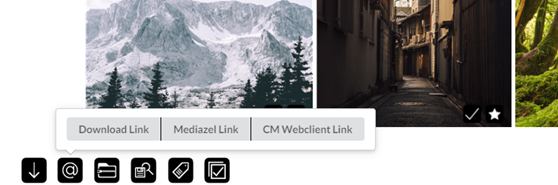
Users can now select the type of link that will be generated in the email.
TOP BAR NAVIGATION
The top navigation bar layout has been redesigned to provide the user will a cleaner and more intuitive interface.

CONTAINER SEARCH
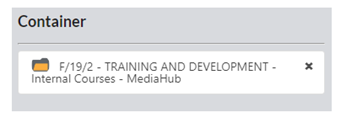
Results can be filtered based on Content Manager containers in the refine panel.
MAIN SEARCHING
User can press enter on their keyboard to perform a search or click on a value from the drop-down list to be more specific.

DYNAMIC UPLOAD FORM
The upload form should now appear as is configured in Content Manager against the Media record type.
ADDITIONAL METADATA MENU
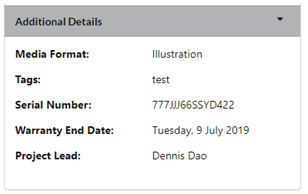
An additional dropdown on the details page has been added. This will load any additional field associated with the media record type.
TAG / UNTAG ALL
A button has been added to allow users to tag all / un-tag all media items from the search results.
EXPORT PDF TAG / UNTAG ALL FIELDS
Tag / untag all functionality has been added to allow users to quickly select or unselect fields when generating a thumbnail pdf report.
SOFTWARE DETAIL WINDOW
A software details window has been added to display basic information about the Mediazel such as its version, license expiration date and data-set. The window can be accessed by clicking on the About button from the navigation bar.
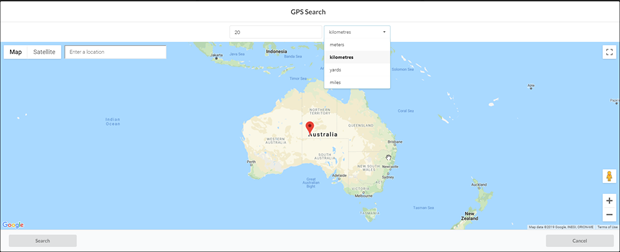
GPS SEARCH
The ability to provide a search radius area has been added.
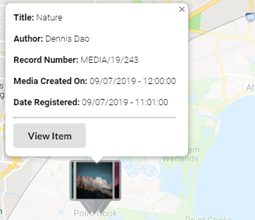
METADATA WINDOW ON MARKER
The ability to click on a marker to view the basic metadata value of the record within the map view has been included.
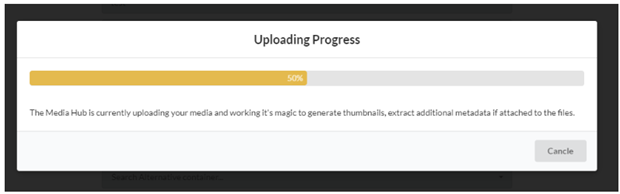
PROGRESS WINDOW
A progress window will now appear when the upload button is pressed. This provides the status of the upload.
ENHANCED FEATURES
SEARCHING
Enhanced title searching to include phrase searching with quotation marks. Containers, Related Records, Location and Classification searches has been significantly improved and supports supported Content Manager search string.
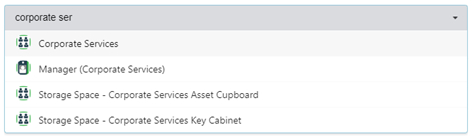
CONTENT MANAGER ICONS
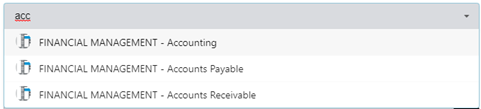
Content Manager icons will now appear for all applicable searches, making content searches recognizable and easily identifiable (as illustrated below).
-
Location
-
Record

-
Container

-
Classification
OVERHAUL REFINE SEARCH
The refine search functionality has been completely overhauled to return more accurate search results based on the criteria.
MEDIA RECORD TYPE CONFIGURATION
The media record type in Content Manager can now be named and configured as required and is specified is the configuration settings of the Mediazel.
BUG FIXES
HARD CODED MEDIA RECORD TYPE
Resolved an issue where users could not search on different media record type names. E.g. “Image”
INACCURATE TITLE SEARCHING
Fixed an issue where title word searching was not returning correct results
DISPLAY OF SMALL IMAGES
Fixed an issue where images below a certain size would not display in the browser.
NOTES FIELDS
Fixed issue with notes fields on upload screen where it was overwriting the tag values.
ZIP DOWNLOAD
Resolved issue where only one user can download a zip file each time.
MAINTAIN SCROLL POSITION
Fixed issue where returning from the detail view where it didn’t maintain the current last view position and the thumbnails are reloaded from the beginning.
LIMITATIONS
UPLOAD LIMITATION
The maximum total upload size is 2GB per file. Some browsers such as Chrome and Opera support 4GB per file.
MANUAL RECORD NUMBERING
The FYB Mediazel doesn’t support a Media Record Type that requires manual entering of the record numbering.
ADDITIONAL FIELDS LINKING TO EXTERNAL ADD-INS
If a Record Type is linked to additional fields that use third party external add-ins, it cannot be used with the Mediazel.
BROWSER IMAGE SUPPORTED FORMAT
Some image formats may not appear in the Mediazel, this is a limitation of the browser when rendering the image to the window. More information about browser image format compatibility can be accessed with the following link: https://en.wikipedia.org/wiki/Comparison_of_web_browsers
AUDIO PLAYBACK - INTERNET EXPLORER
.M4A extension is not supported with Internet Explorer as this is a browser limitation. Please use Chrome, Firefox or Edge as an alternative.
VIDEO PLAYBACK – FIREFOX
When viewing .MOV media items on Firefox the audio may be permanently muted, Firefox will require the Quick Time player plugin installed for this functionality to work