
Mediazel Release Notes 7.2.x
OVERVIEW
This release of the FYB Mediazel includes all fixes and enhancements that were shipped in the previous releases of the product. For details of previous releases, please refer to the relevant release notes.
RELEASE 7.2.8
NEW FEATURES
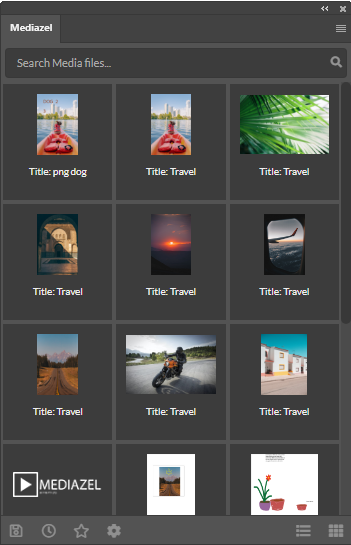
MEDIAZEL ADOBE CONNECTOR
Exciting news! The FYB Mediazel is now shipped with an Adobe connector which has bridged the gap between Content Manager and Adobe. The Mediazel Adobe connector provides users with a convenient way to view, edit, and create new media documents from within the following Adobe applications.
- Illustrator
- Indesign
- Photoshop
WATERMARK IMAGE
This feature will allow admins to upload a watermark overlay for their organization and allow end-users to download the watermarked version of any image.

LICENSE EXPIRY NOTIFICATION
A license expiry notification option has been added to the application. Admins can now set up an alert that will notify them 10 days prior to their license expiring.
ENHANCED FEATURES
HOVER OVER TEXT
A hover-over effect has been added to the fields in the refined search section. This allows users to see the full title of fields if they are too large and become truncated by the application.
DOWNLOAD IMAGE SELECTION
The options for downloading an image have been made clearer to determine which option is or is not available.
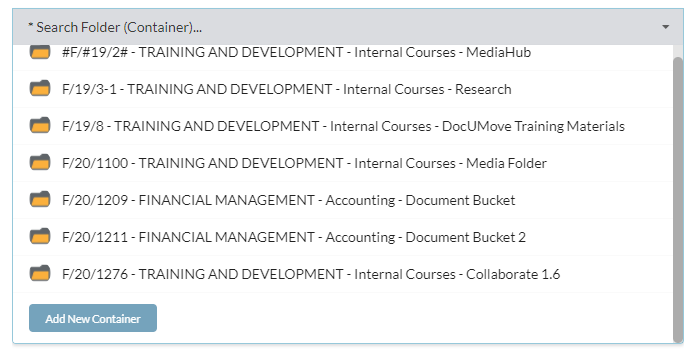
CREATE NEW CONTAINER OPTION
The create new container option was previously only available if a search for a container had failed. This has been made more user friendly and is available once clicking in the container field.
BUG FIXES
CUSTOM REFINE FIELDS
Squashed a bug where custom refine field searches were not returning results when using File extension and Date created fields.
LIMITATIONS
UPLOAD LIMITATION
The maximum total upload size is 2GB per file, which is a browser limitation. Some browsers such as Chrome and Opera support 4GB per file.
MANUAL RECORD NUMBERING
Mediazel does not support a Media Record Type that requires manual entering of the record numbering.
ADDITIONAL FIELDS LINKING TO EXTERNAL ADD-INS
If a Record Type is linked to additional fields that use third party external add-ins, it cannot be used with Mediazel.
BROWSER IMAGE SUPPORTED FORMAT
Some image formats may not appear in Mediazel, this is a limitation of the browser when rendering the image to the window. More information about browser image format compatibility can be accessed with the following link
AUDIO PLAYBACK - INTERNET EXPLORER
.M4A extension is not supported with Internet Explorer as this is a browser limitation. Please use Chrome, Firefox, or Edge as an alternative.
VIDEO PLAYBACK – FIREFOX
When viewing .MOV media items on Firefox the audio may be permanently muted, Firefox will require the Quick Time player plugin installed for this functionality to work.
GOOGLE VISION FILE LIMIT
Please note that there is a 10mb file upload limit when using Google Vision. This is a setting of Google’s and not a setting of Mediazel. If a file is greater than 10mb is uploaded with Google Vision then the upload can potentially fail.