
Web Client Enhancement Suite Admin Guide
Settings can only be updated by CM Administrators or Records Managers.
GENERAL SETTINGS
All settings updated within the general web client Enhancement Suite configuration will be applied to all modules.
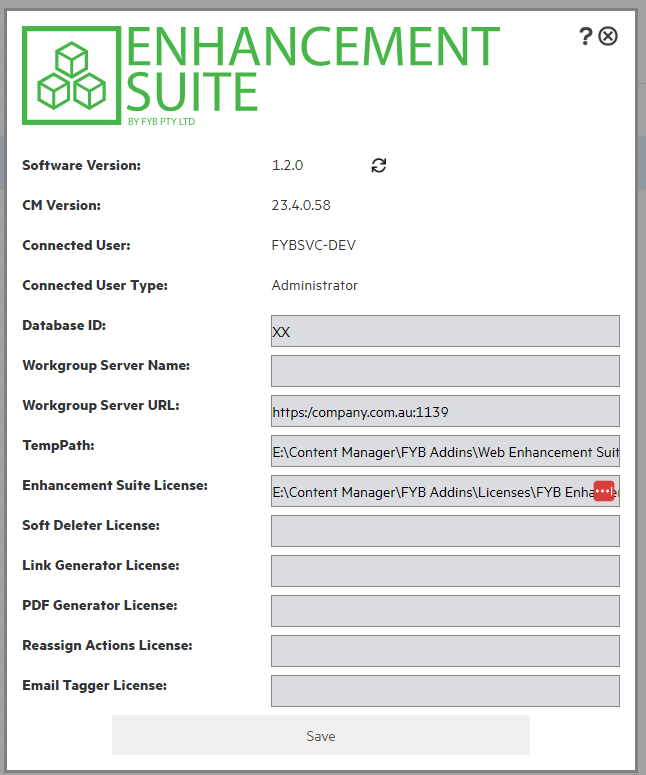
General information found within the settings:
| NAME | DESCRIPTION |
|---|---|
| Software Version | The currently installed software version of the web client enhancement suite. |
| CM Version | The software version of the installed Content Manager version |
| Connected User | The name of the connected user to the CM web client |
| Connected User Type | The user type profile of the connected user within the CM web client |
The following setting can be updated:
DATABASE ID

The Database ID used to connect the web client enhancement suite to the Content Manager dataset.
WORKGROUP SERVER NAME

The workgroup server name used to connect for the Content Manager. Connection can be made using either the workgroup server name or workgroup server URL.
WORKGROUP SERVER URL

The workgroup server URL used to connect for the Content Manager. Connection can be made using either the workgroup server name or workgroup server URL.
TEMP PATH

The temporary path used by the web client enhancement suite.
Using the enhancement suite license, allows for access to all modules within the web client enhancement suite. There is no need to provide the license path for the individual modules if utilizing the enhancement suite license.
To utilise singular modules, provide the individual license into the required module license path.
ENHANCEMENT SUITE LICENSE PATH

The path to the FYB Enhancement Suite license. This license will gain access to all enhancement suite modules.
SOFT DELETER LICENSE PATH

The path to the FYB Soft Deleter license. This license path should only be populated if an enhancement suite license has not been provided.
LINK GENERATOR LICENSE PATH

The path to the FYB Link Generator license. This license path should only be populated if an enhancement suite license has not been provided.
PDF GENERATOR LICENSE PATH

The path to the FYB PDF Generator. This license path should only be populated if an enhancement suite license has not been provided.
REASSIGN ACTIONS LICENSE PATH

The path to the FYB Reassign Actions license. This license path should only be populated if an enhancement suite license has not been provided.
EMAIL TAGGER LICENSE PATH

The path to the FYB Email Tagger license. This license path should only be populated if an enhancement suite license has not been provided.