
Web Client Enhancement Suite License Update Guide
LICENSE DETAILS
Please contact FYB for a valid license if you are yet to obtain one for your add-in.
TRANSFER LICENSE TO THE SERVER
Your new license file(s) will need to be transferred to the server where the FYB WebClient Enhancement Suite API is installed. This is usually the Content Manager web server. Once the license has been transferred and stored in a suitable location note down the full path to the license, for example: C:\FYB Add-Ins\Licenses\FYB Enhancement Suite_13032100.lic
FYB WEBCLIENT API - UPDATING THE LICENSE
To update a new license for the FYB WebClient API please follow the steps below:
-
Navigate to the server where the FYB WebClient API is installed and open IIS
-
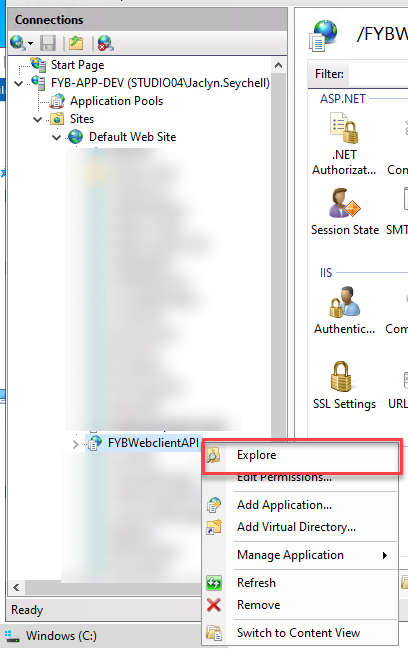
Right click on the FYBWebClientAPI application, click Explore
-
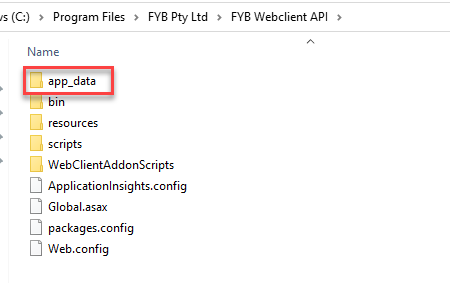
Navigate to the App Data folder
-
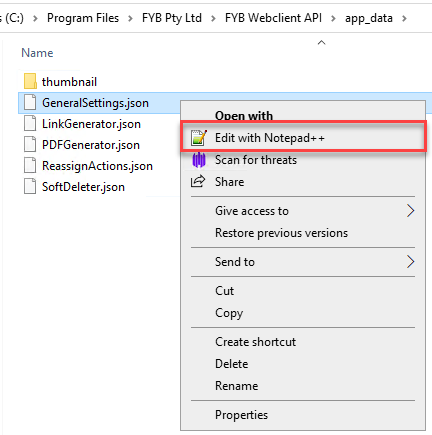
Edit the GeneralSettings.json
-
Update the appropriate license field with the location of your new license, for example: C:\FYB Add-Ins\Licenses\FYB Enhancement Suite_13032100.lic
 Licensesing
If utilising the whole application, only the enhancement suite license path needs to be populated. The other paths do not need to be populated.
If utilising only selected applications (i.e Soft Deleter and Link Generator only), the license paths of the approrpiate applications must be populated.
General SettingsPlease note that all general settings will be adhered to for all applications. They all share the same dataset and tempath settings.